Pushgateway 是什么?
pushgateway 是另一种数据采集的方式,采用被动推送来获取监控数据的prometheus插件,它可以单独运行在
任何节点上,并不一定要运行在被监控的客户端。
首先通过用户自定义编写的脚本把需要监控的数据发送给 pushgateway,pushgateway 再将数据推送给对应的
Prometheus 服务。
对于短时运行、不支持轮询的任务,可以引入 pushgateway,将指标数值以 push 的方式推送到 pushgateway暂存,然后 prometheus 从 pushgateway 中轮询。
PushGateway:短期存储指标数据。主要用于临时性的任务,各个目标主机可以上报数据到 pushgateway,然后
prometheus server 统一从 pushgateway 拉取数据。
Pushgateway 是 prometheus 的一个组件,prometheus server 默认是通过 exporter 主动获取数据(默认采取
pull 拉取数据),pushgateway 则是通过被动方式推送数据到 prometheus server,用户可以写一些自定义的监控
脚本把需要监控的数据发送给 pushgateway, 然后 pushgateway 再把数据发送给 Prometheus server。
使用pushgateway的原因
1、因为Prometheus 采用 pull 模式,可能由于不在一个子网或者防火墙,导致 Prometheus 无法直接拉取各个
target 数据。
Prometheus 在一些情况下无法直接拉取各个 target 数据。
2、在监控业务数据的时候,需要将不同数据汇总,由 Prometheus 统一收集。
使用pushgateway的弊端
由于以上原因,不得不使用 pushgateway,但在使用之前,有必要了解一下它的一些弊端:
1、将多个节点数据汇总到 pushgateway,如果pushgateway 挂了,受影响比多个 target 大。
通过单个 Pushgateway 监控多个实例时, Pushgateway 将会成为单点故障和潜在瓶颈。
2、Prometheus 拉取状态 up 只针对 pushgateway, 无法做到对每个节点有效。
3、Pushgateway 可以持久化推送给它的所有监控数据。 因此,即使你的监控已经下线,prometheus 还会拉取
到旧的监控数据,需要手动清理 pushgateway 不要的数据。
总结:
    Prometheus拉取状态只针对 pushgateway,不能对每个节点都有效。
    Pushgateway出现问题,整个采集到的数据都会出现问题。
    监控下线,prometheus还会拉取到旧的监控数据,需要手动清理 pushgateway不要的数据。
工作流程图
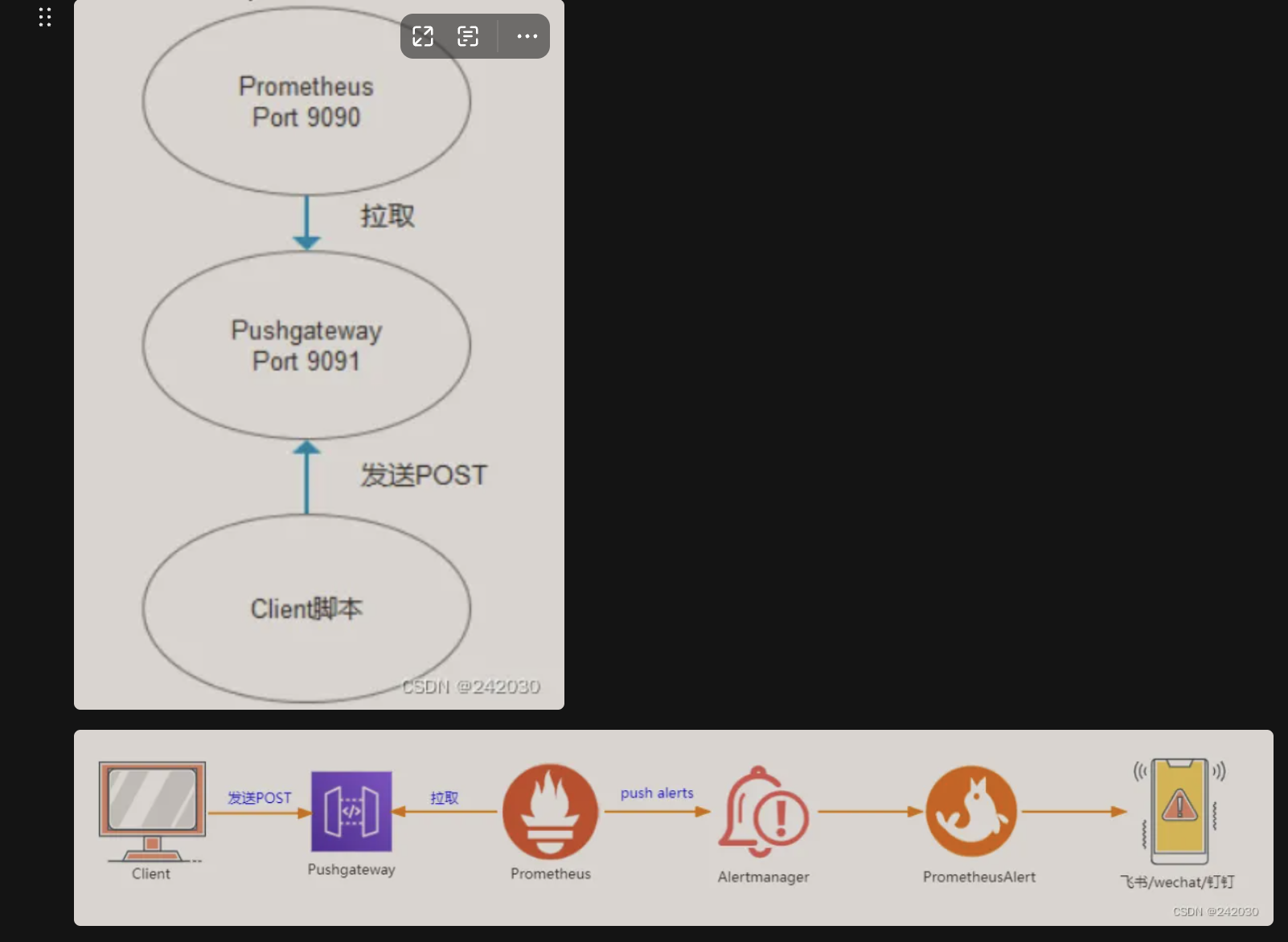
流程:通过客户端 POST数据至pushgateway,prometheus拉取pushgateway里数据,经过alertmanager报警规则触发,到prometheusalert自定义模板,最后钉钉机器人发送该报警信息。docker部署pushgateway
部署
docker pull prom/pushgateway
docker run -d -p 9091:9091 prom/pushgateway
修改配置
vim prometheus.yml
  - job_name: pushgateway
    static_configs:
      - targets: ['101.43.145.161:9091']
        labels:
          instance: pushgateway
定义应该job推送至pushgateway
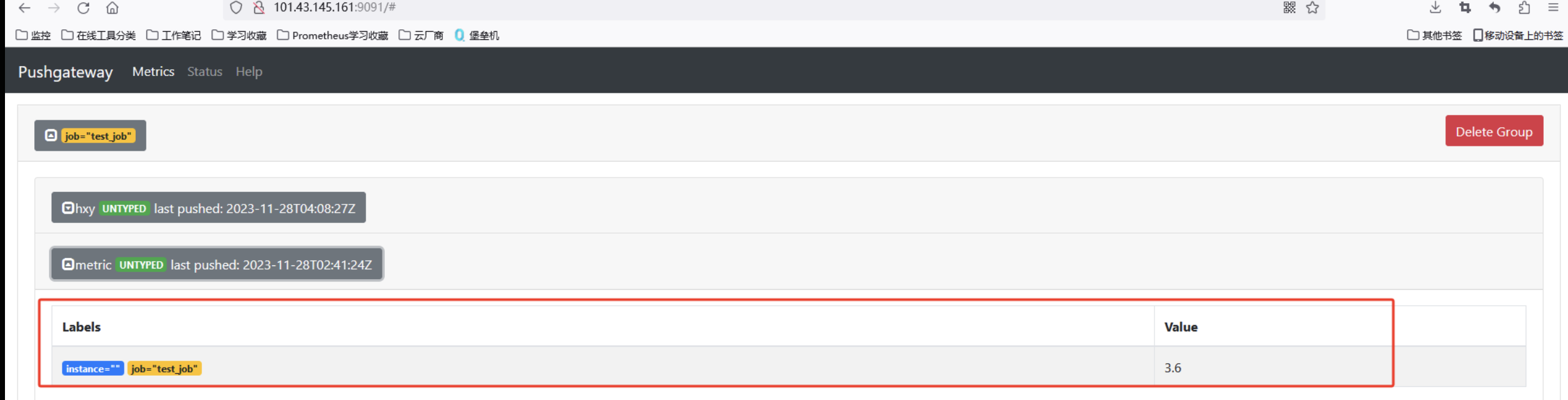
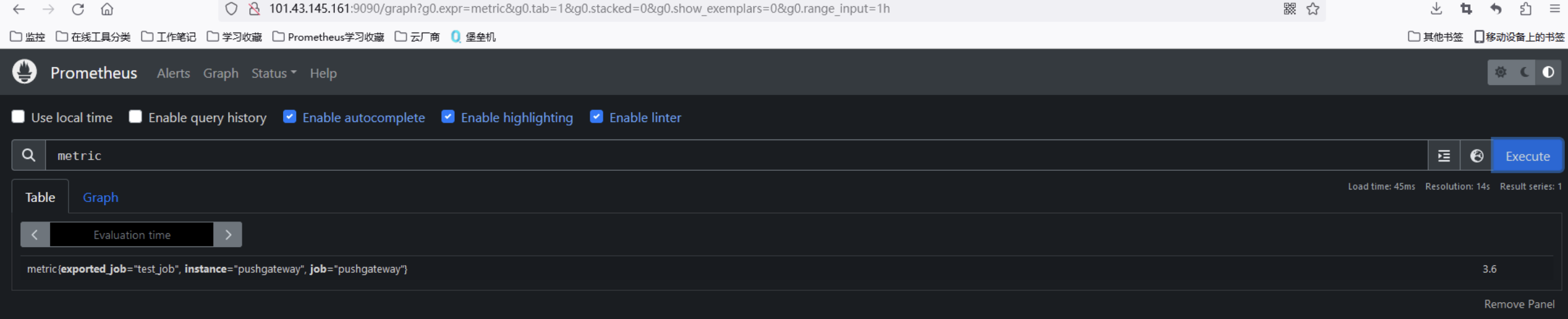
指标名称:   Value值:3.6   指定job:test_job
在数据端执行,推送数据
echo "metric 3.6" | curl --data-binary @- http://101.43.145.161:9091/metrics/job/test_job
验证推送数据
验证prometheus 接收数据指标
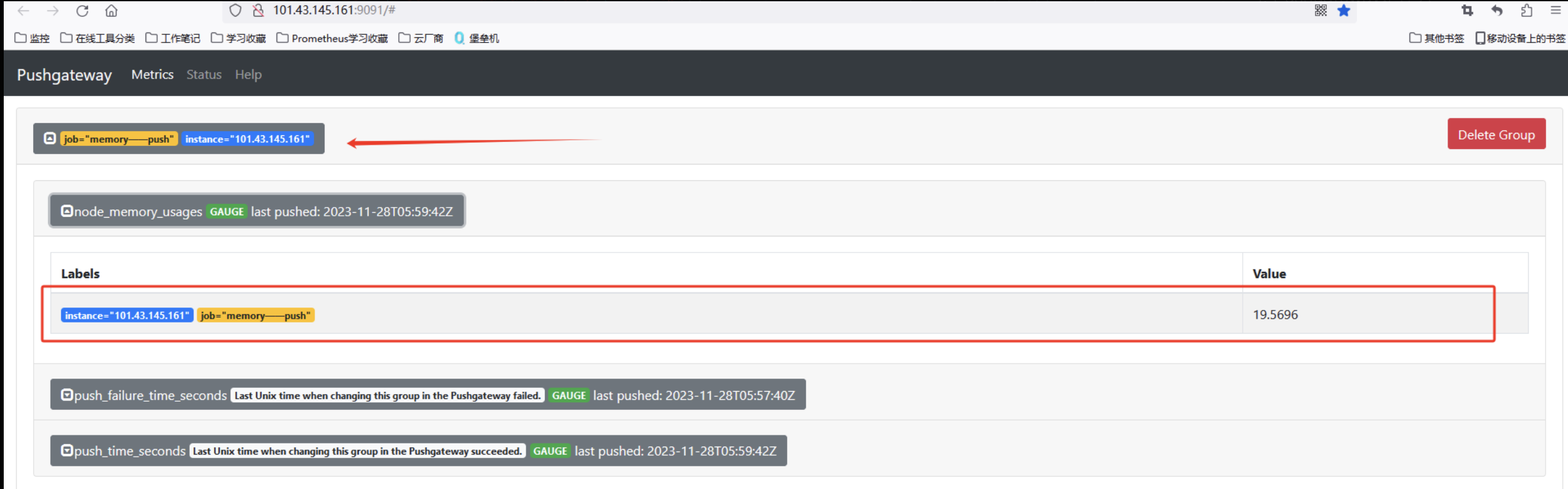
使用shell自动化定时采集指标推送
[root@VM-8-2-centos prometheus]# cat push.sh
#!/bin/bash
node_memory_usages=$(free -m | grep Mem | awk '{print $3/$2*100}')
job_name="memory_push"
instance_name="test_node1"
cat <<EOF | curl --data-binary @- http://101.43.145.161:9091/metrics/job/pushgateway/instance/$instance_name
# TYPE node_memory_usages gauge
node_memory_usages $node_memory_usages
EOF


最后扔到crontab自动采集即可
* * * * * /bin/bash push.sh
UI展示效果
1.pushgateway
2.prometheus

